
Fine-tune Smaller Transformer Models for Specific Tasks
This article will help you understand how to start working with smaller open source NLP models for specific use cases, why it can be more effective, as well as go through how to fine-tune a base model on your own.
I’ll get really nitty gritty and fine-tune a sequence to sequence model (BART) with a custom dataset for a specific use case — keyword extraction of texts for specific tech terms. The final model you’ll find here.
I’ll keep fine-tuning this model, but for now it works decently. If you’re wondering what good the model will do, I’ll get to that later.
I’ve also organized all material I’ve gathered in this Github repo if you’ll need it. This one has intel on the different base models, tasks and business cases as well as examples of fine-tuned models.
I’d also like to mention that what we’ll embark on here is completely free. Working with smaller open source models is a tad more complicated but a lot cheaper in the long run.
Do you need more convincing? Then go through the introduction section otherwise skip it and go to the training section directly.
Large vs Small Models
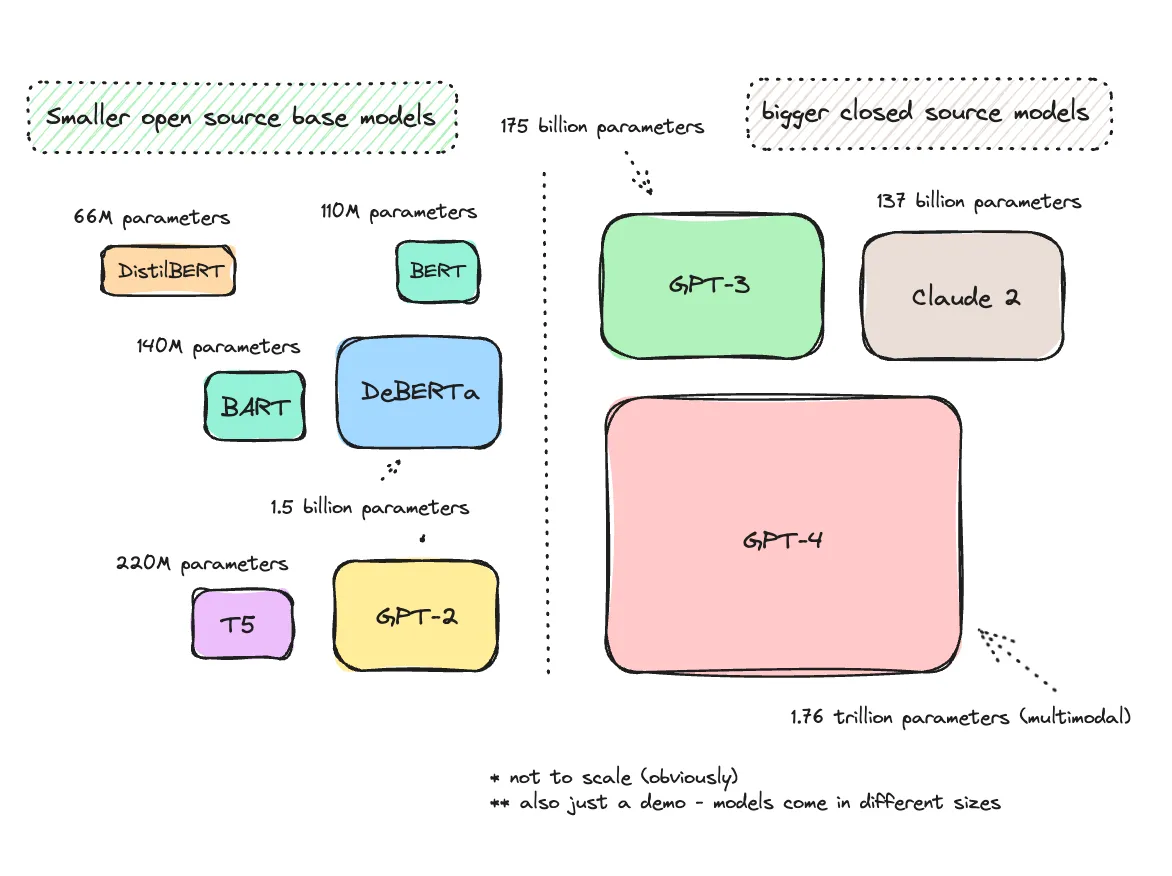
It’s easy to assume that using the largest and most advanced models out there — such as GPT-4 or GPT-3 — is the most efficient way to work with NLP tasks. I think we can all agree that GPT-4 — and event GPT-3 — excels in various areas. I use it quite often and could very well use it for anything such as sentiment analysis, categorizing documents, and translations.
Although amazing, GPT-4 — and even GPT-3— are quite large models.
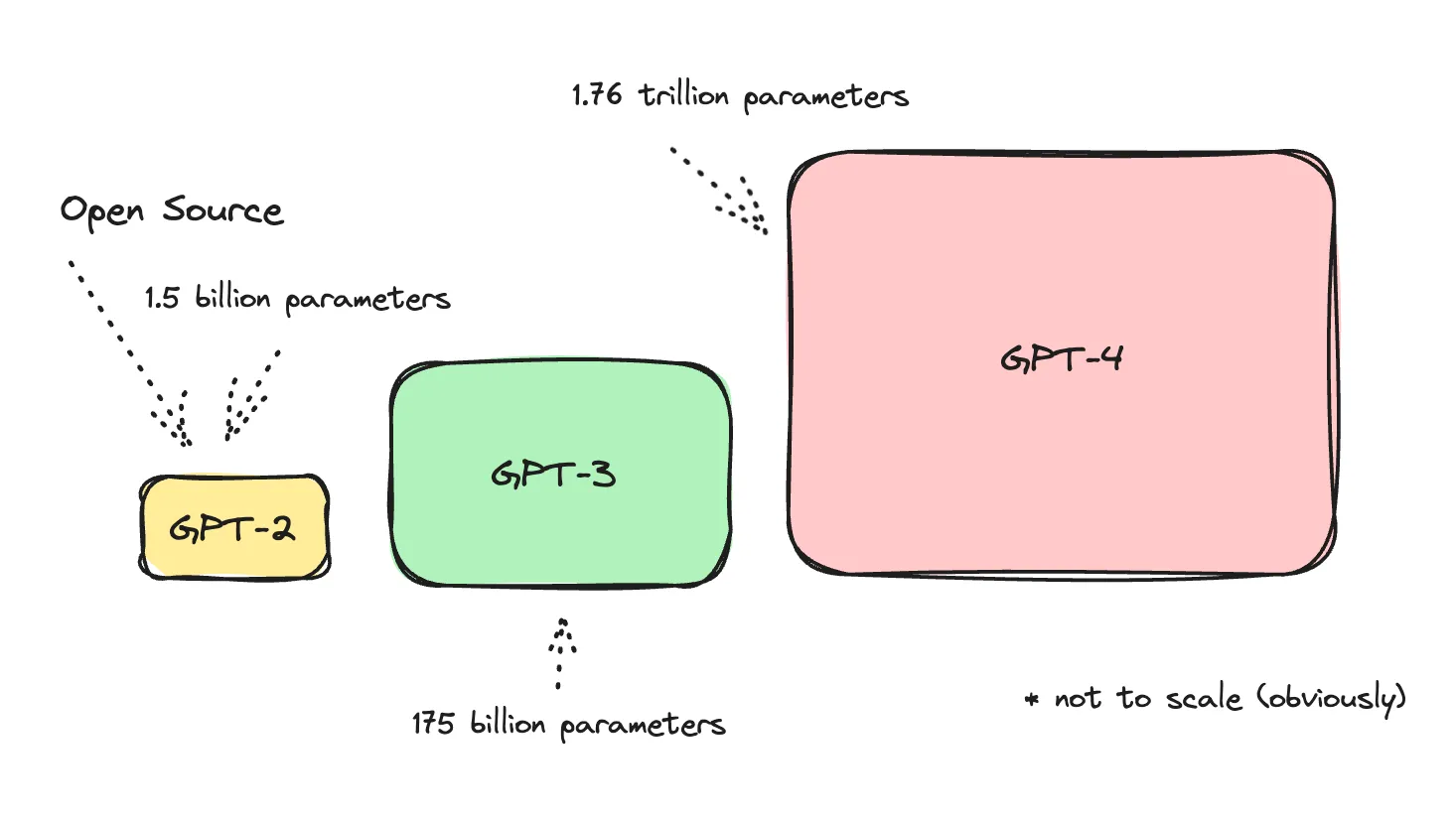
GPT, specifically, is a text generation model and is built primarily for content generation, which is amazing for creative writing or marketing content, developing chatbots and whatnot. So, although so advanced that it can do anything at this point, it was not technically made for all NLP tasks.
As a side note, most larger language models out there — open source as well — are text generation, decoder, models.
So what is the difference between a decoder and other models? See a table below for three examples of open source models, their model types and the specific tasks they were trained for.
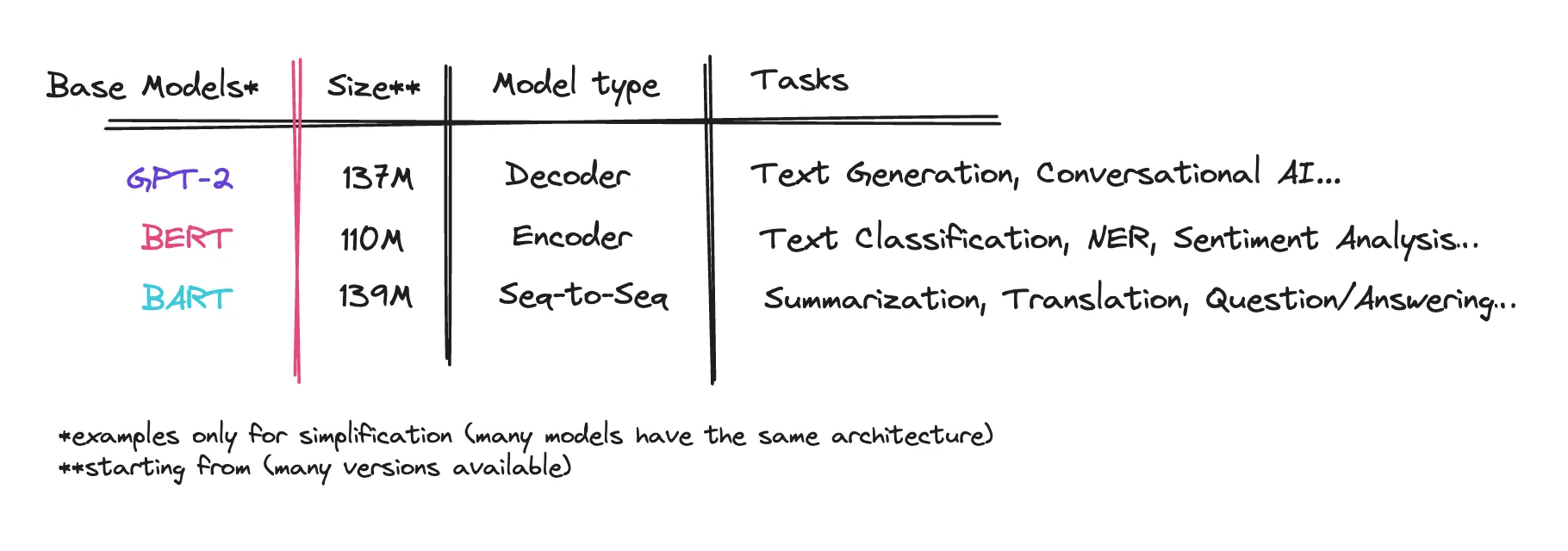
GPT-2 is an open source model, but obviously the more advanced models by OpenAI are all closed source. BERT and BART is what is interesting to us here, and excel in other areas which we’ll talk about further.
If you’re wondering how these models tasks fits into a specific business case, go here to brainstorm. You’ll see examples of cases based on tasks for encoder, decoder and seq-to-seq models.
If you’re confused, skip it for now. Just know that all of these models, along with GPT, were originally built for different NLP tasks.
When choosing a model you should also consider more than simply performance but also computational resources and cost. When you get introduced to AI with GPT-3, it’s easy to disregard the other choices out there.
Sometimes, smaller, less complex models — fine-tuned for a specific use case — is more efficient in terms of resource usage and speed. It will also be significantly less expensive.
Let’s illustrate this.
Say we’re doing something banal, like analyzing sentiment or summarizing content. We’re scraping certain social media sites or maybe customer service conversations and then using AI to analyze its content, summarizing and giving us a report.
Let’s look at the costs of using a larger closed source model like GPT-4 Turbo, GPT-3.5 Turbo, or Claude 2 if we were to analyze up to 3,000 texts per day with 400 tokens input and 200 tokens out.
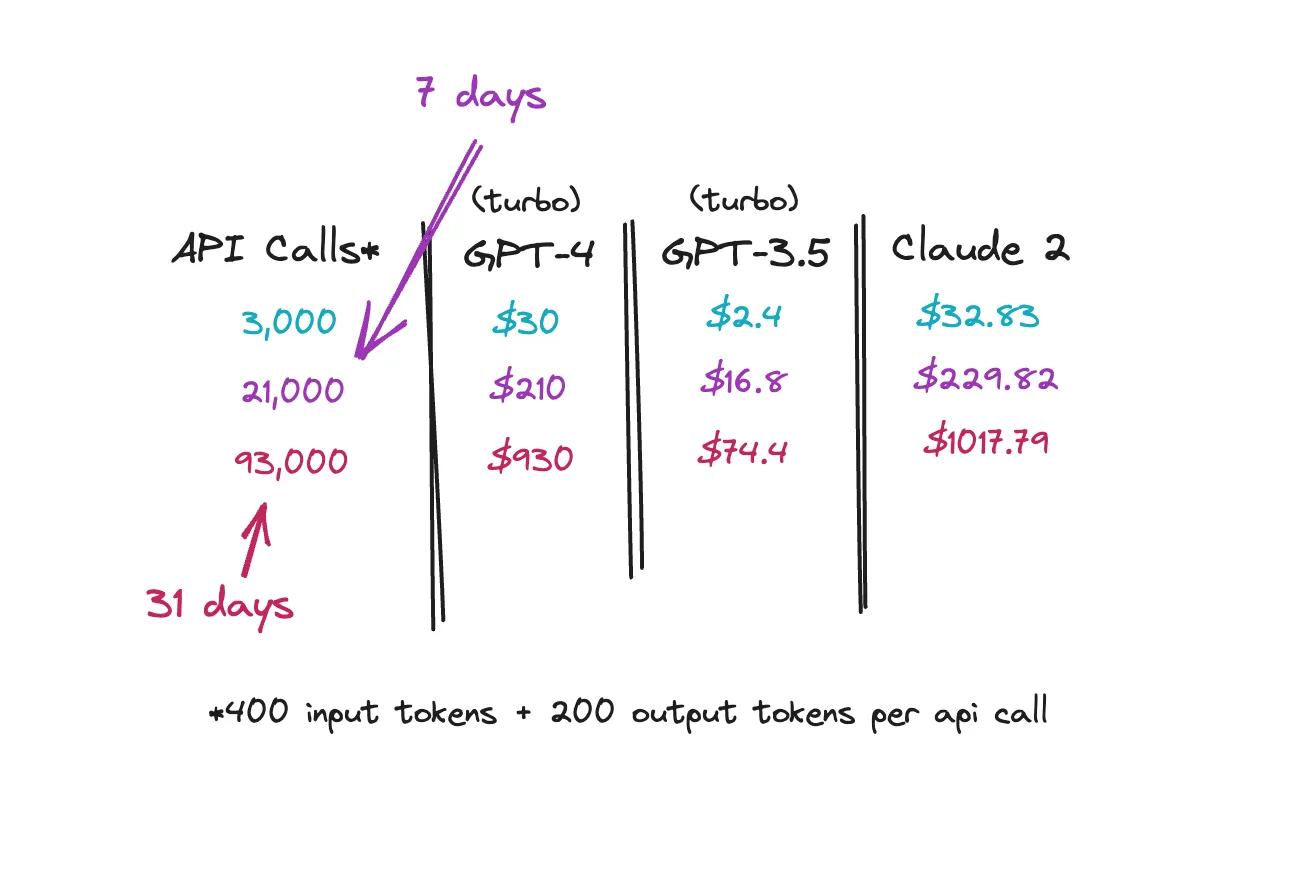
We could obviously try to batch the texts in the same API calls but then our tokens would increase. The idea is though, that using these larger models for something simple is overkill.
I also need to stress, that when we build our own models we try to make them as small as possible because we also have to host them. Hosting can be very expensive.
Let’s look at a few smaller open source fine-tuned models in Hugging Face that does sentiment analysis and summarization here and here. These are fine-tuned models performing on a specific task.
Below is also another sentiment analysis model built on RoBERTa, an encoder model, that helps you classify the sentiment of texts as positive, negative or neutral.
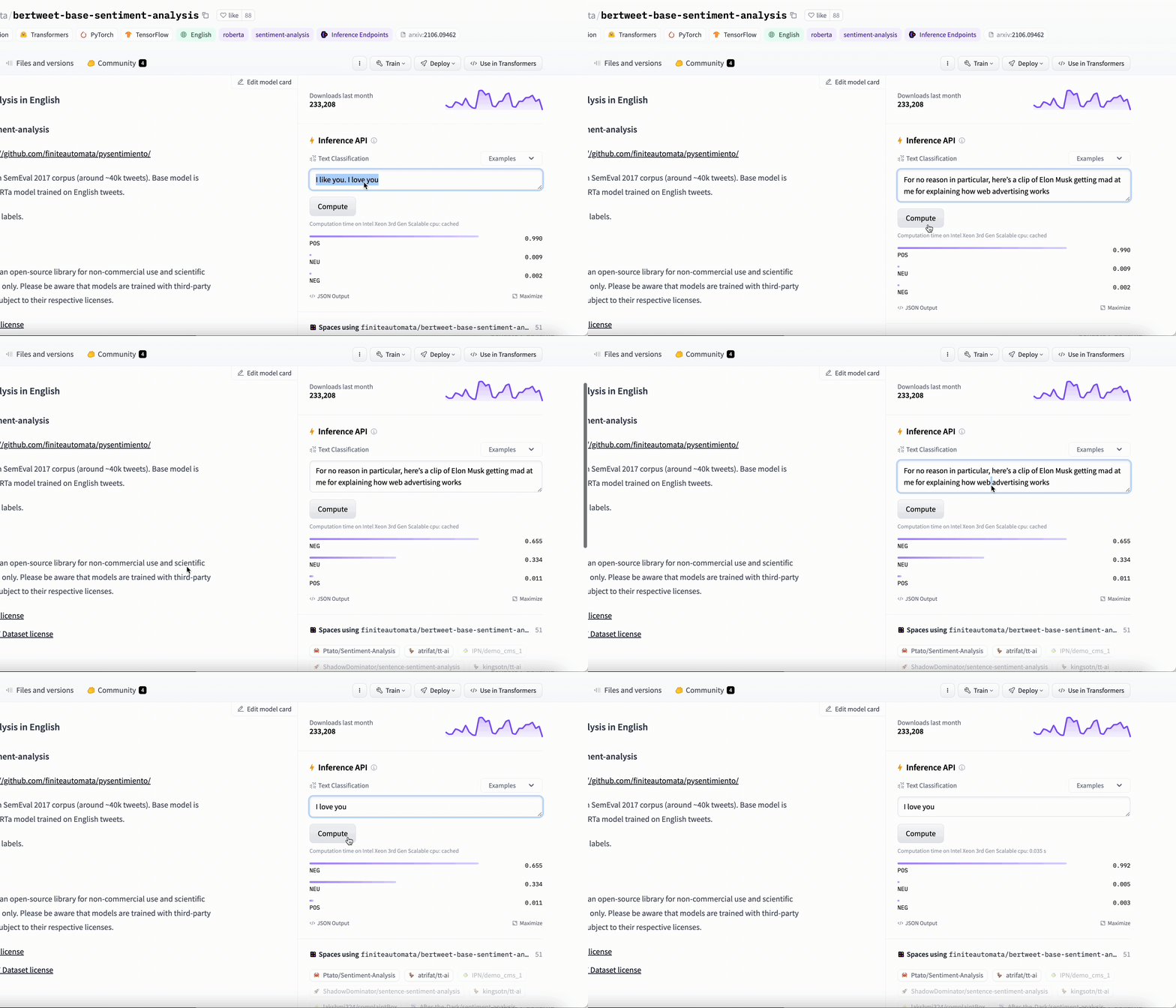
These are just examples. Go browse your own.
As a side note, when you test the models on the Hugging Face hub, you are using the Inference API which is for testing purposes only. If you want to go ahead connect to the models in Colab with Hugging Face’s pipeline use this script.
There are tons of more models available. Just to demonstrate, here is one to spot fake news, one to classify clickbait articles and so on.
This is still very new, so models are a bit here and there and it’s hard to understand the performance of each model. You can look at likes and downloads. You should obviously test them too. But you’ll see more and more fine-tuned models being shared, maybe they’ll be a bit more organized in the future as well.
Nevertheless, the point is that you’ll find a several models that are vastly smaller than GPT-4 or Claude that might do well enough for your specific use case, especially when you account for cost.
As for how to use a Hugging Face model in your application, you can deploy your model using Hugging Face’s Inference Endpoints and let the application scale to 0 when not in use. For a model with 400 million parameters you would pay from $0.5 per hour (when in use) for a small GPU instance. You can also use the model directly in Google Colab or locally with Hugging Face’s pipeline for free.
There are also tools such as Replicate and Modal that offer cloud hosting with pricing per second of use. The other option is to containerize a model on your own and expose them via an API endpoint, using AWS for hosting.
So, Hugging Face is a great hub for finding and sharing open source models and datasets. As for hosting them, the future looks really bright. But the key here is how to actually train these smaller base models for a specific use case.
Hugging Face has simplified this for us too in various ways giving us an accessible training API, pre-built tokenizers and dynamic padding collators. What this means is that they will give us the correct tools to easily fine-tune these models without extensive machine learning knowledge.
Just as a side note about the transformers architecture, transformers have made it much easier for computers to understand and interact with human language. It has a unique structure that allows it to process words in relation to all other words in a sentence, rather than one at a time sequentially. This has made it possible to understand context better than previous models.
Transformers has therefore improved the output quality in general, which is something you’ve seen if you’ve tried ChatGPT, that offers fine-tuned versions of GPT-3 and GPT-4. I won’t go further than that as there is a lot of information out there you can scout. Check the Hugging Face learning hub, they have some great resources.
Instead, I’ll get right into working with a specific use case.
Task: Keyword Extraction
I came to Hugging Face because I was keen to build a fine-tuned model that would extract specific tech terms (i.e. keywords) from texts. I think we forget how well these NLP models can do at things we used libraries such as NLTK for before.
See an example of me trying to extract keywords from a text using NLTK, spaCy and KeyBERT below.
sample_text = """So, I want to make a dashboard in [Bubble.io](https://Bubble.io). In said Dashboard, I want the "Analytics" of my Shopify-Store to be displayed nicely to the user.  Since I haven't used Bubble yet, what do I need to do, what do I need (to set up)?"""

# NLTK
print("NLTK Keywords:")
print(extract_keywords_nltk(sample_text))

# NLTK Keywords:
# [('want', 2), ('dashboard', 2), ('need', 2), ('make', 1), ('https', 1), ('said', 1), ('analytics', 1), ('displayed', 1), ('nicely', 1), ('user', 1)]

# spaCy
print("\nspaCy Keywords:")
print(extract_keywords_spacy(sample_text))

# spaCy Keywords:
# [('want', 2), ('need', 2), ('dashboard', 1), ('said', 1), ('Dashboard', 1), ('Analytics', 1), ('Shopify', 1), ('Store', 1), ('displayed', 1), ('nicely', 1)]

# KeyBERT (provided by Hugging Face also)
print("\nKeyBERT Keywords:")
print(extract_keywords_keybert(sample_text))

# KeyBERT Keywords:
# [('analytics shopify', 0.7067), ('dashboard bubble', 0.6169), ('make dashboard', 0.5868), ('dashboard', 0.5715), ('dashboard want', 0.5541), ('shopify', 0.4827), ('shopify store', 0.4775), ('said dashboard', 0.4369), ('want analytics', 0.43), ('analytics', 0.4256)]
None of these libraries did what I need it to do. If I would aggregate thousands of texts the words that would be at the top would be ‘want’ ‘make’ and ‘said.’
You’ll see me testing KeyBERT above as well which is a library that is provided by Hugging Face and built on an enconder model (BERT). Unfortunately, it didn’t work well enough for my use case.
Here the keywords I would be looking for.
Bubble.io, Shopify, Analytics
To be able to do this, I would need something very specific most libraries wouldn’t be able to provide.
I did find a model that had already been fine-tuned in Hugging Face and that did a decent job. Check out the results from this model below.
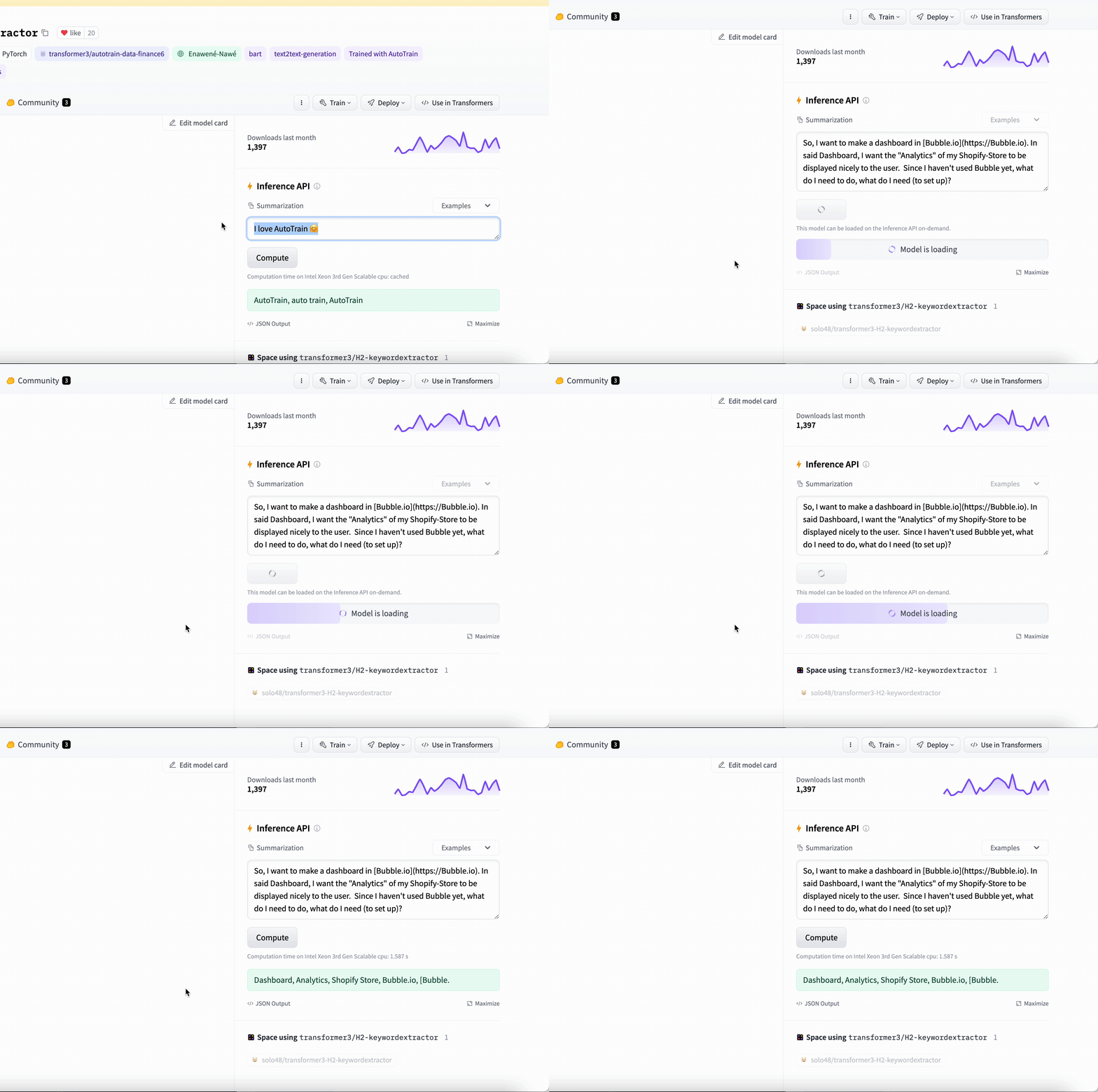
Better but not good enough.
If I test a few more texts with the fine-tuned BART model I found above I would get these results.
from transformers import pipeline

pipe = pipeline("summarization", model="transformer3/H2-keywordextractor")

print(pipe("Simplifying Docker Multiplatform Builds with Buildx"))
# Keywords generated: Docker Multiplatform Builds, Buildx, Docker Multiplatform, Multiplatform Building, Installability, Container Store, Security, Transaction Support

print(pipe("Dissecting ByteByteGo’s Notification System Design Solution"))
# Keywords generated: ByteByteByteGo, Notification System Design Solution, ByteByteByte

print(pipe("Utilizing the Lease Pattern on AWS Using DDB and DDB Lock Client Library"))
# Keywords generated: lease pattern, DDB and DDB Lock Client Library, Lease Pattern, AWS, leases, amr research, integration middleware, security, transaction support
I needed something cleaner than this. The words returned weren’t always isolated, correct nor relevant.
So let’s check out the fine-tuned model I built below. I’ll demonstrate it with the same texts I used above.
from transformers import pipeline

pipe = pipeline("text2text-generation", model="ilsilfverskiold/tech-keywords-extractor")

print(pipe("Simplifying Docker Multiplatform Builds with Buildx"))
# Keywords generated: Docker, Buildx, Multiplatform Builds

print(pipe("Dissecting ByteByteGo’s Notification System Design Solution"))
# Keywords generated: ByteByteGo, Notification System Design

print(pipe("Utilizing the Lease Pattern on AWS Using DDB and DDB Lock Client Library"))
# Keywords generated: Lease Pattern, AWS, DDB, Lock Client Library
See how it returns just a few relevant keywords making sure to separate names such as Docker? This is what I needed. By being able to extract the correct keywords, I can do analysis on thousands of texts.
The model I’ve built is not perfect as I’ve only fine-tuned it once. As for trying the model yourself, it is open-source so you may use it here.
To build this model I had 50,000 titles of different sizes I’ve accessed from various social media platforms using their public API endpoints. I was too lazy to process all of it as a first go but I did a trial of 3,000 texts along with 8,500 texts. The first trial run did alright with 3,000 data points but it wasn’t good enough so I went back to process 5,500 more rows.
I did use GPT-4 as help to transform the text to keywords. I dished out $30 for 10,000 texts, batched by 10 for every API call. Here is the repository for the script if you need to build your own dataset.
You need to make sure that the keywords are exactly the keywords you want generated so I had to manually go through 8,500 rows. As anyone will tell you, data is the biggest factor for fine-tuning. What you put in will come out.
It’s good to know, that quality trumps quantity always. You want quality data first, then if you can you add on to it.
I’ve shared my processed dataset of 8,500 rows here so check it out or use it yourself.
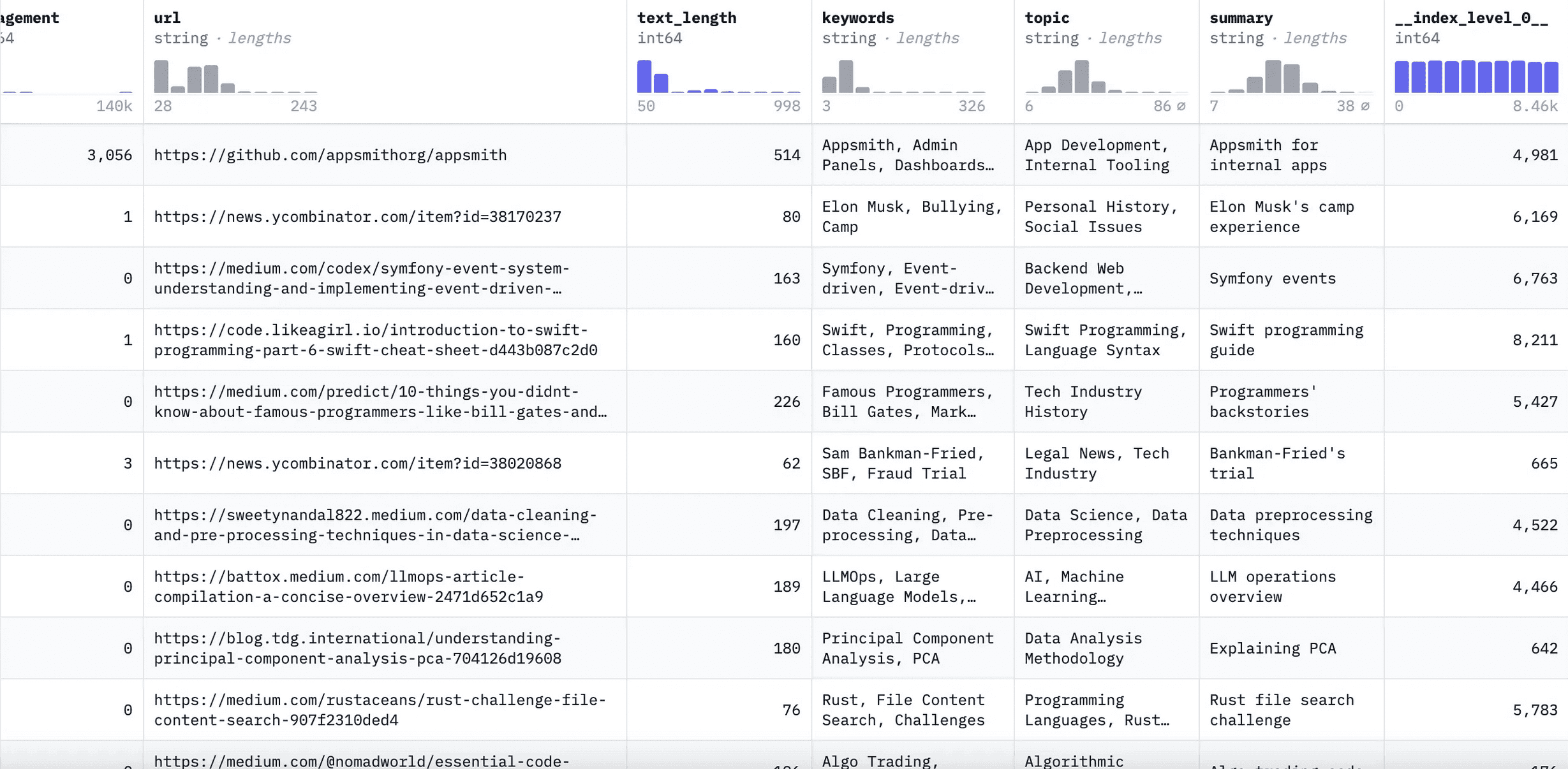
This dataset has several fields but the ones I’ve added are keywords, topic and summary. Go nuts with that one if you want to build a different model, i.e. you can build a model that gives you the topic or a 3 word summary of the text rather than keywords.
To process my dataset from Hugging Face to Colab check out this script. We’ll go through processing this one later too though when fine-tuning the model.
Process for Building the Model
Let’s go through the process to to build this keyword model. If you have another use case in mind for a sequence to sequence model, this process should work the same.
The parts will be as follows.
- Explore models & tasks
- Set up your dataset
- Process the data
- Train the model & test it
- Push the model to Hugging Face
If you’re not comfortable with code what so ever, I would suggest giving Hugging Face’s AutoTrain a go. I think the first process is free but otherwise you’ll have do dish out some cash to continue to use this service.
Remember to make sure your dataset is on-point regardless.
If you want to do this manually with their trainer API manually, read on. This will be completely free.
Also use this Hugging Face GPT if you run into issues. Great for weird questions you don’t want anyone to see. I build one for anything I do nowadays.
Deciding on Model Architecture
First, it’s good to just explain a bit about encoder vs decoder NLP models, especially when working with smaller models. There should be a ton of information you can scout on this too, so I’ll keep it concise.
The fundamental difference is that an encoder model will generally generate condensed outputs from larger inputs whereas decoder models will generally expand or generate data from a smaller input.
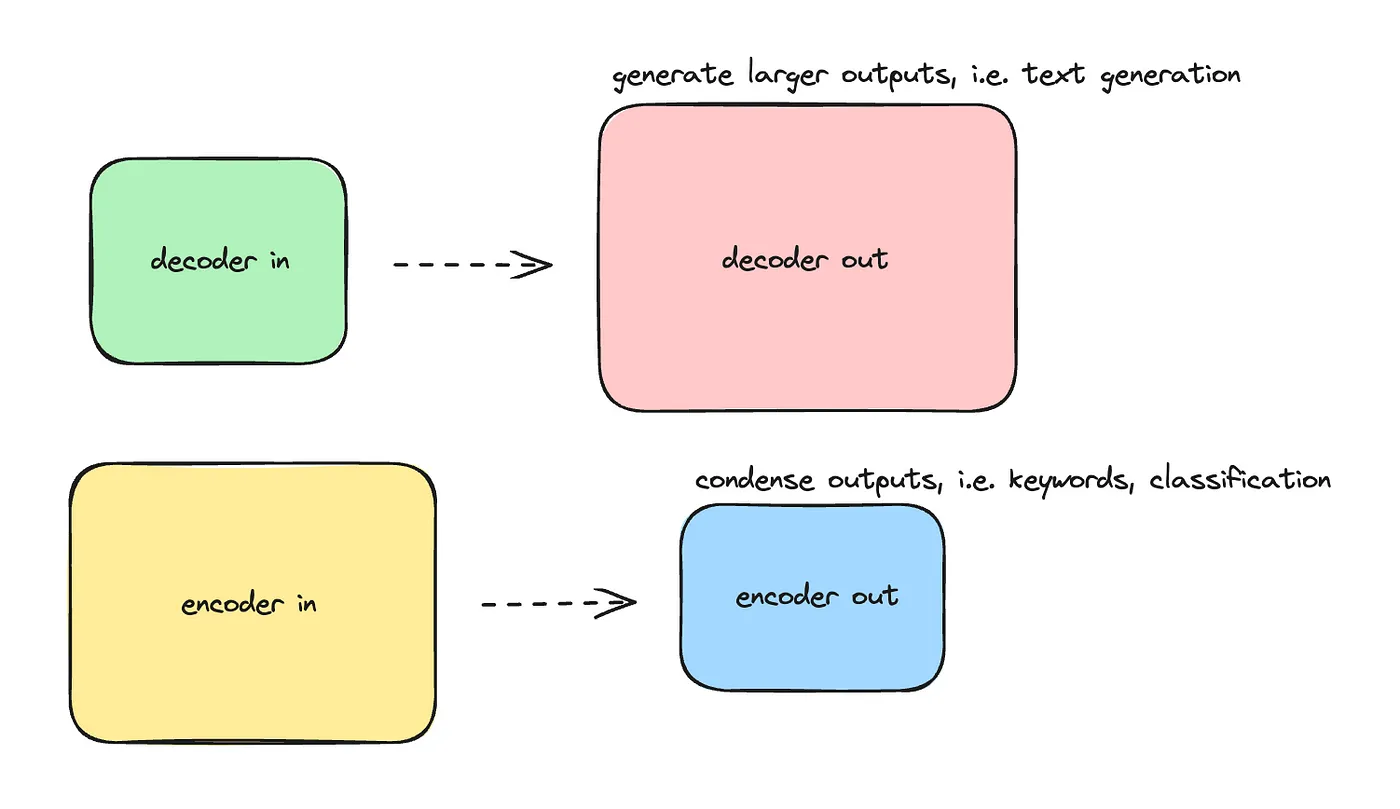
The technical explanation is that a decoder will look at the next sequence, i.e. what word comes next, while an encoder model will look at the text in its entirety to understand the meaning of the entire input.
A decoder model is more concerned with generating the next sentence while an encoder model focuses on analyzing and derive meaning from the entire text.
A decoder model — like GPT — thus excels in tasks like text generation, where you start with a small amount of information and need to create a more extensive coherent output. An encoder model, on the other hand, is trained to understand the context or the big picture, which is great for tasks where you want to classify or extract content.
Sequence-to-sequence models is a mix of encoder and decoder, where the encoder processes the input and the decoder generates the output. The first transformer model that was introduced in the “Attention is All You Need” paper was a sequence to sequence model.
I think of sequence to sequence (Seq2Seq) models as models that will be able to provide condensed outputs that are a bit more coherent compared to encoder models. I.e. it will excel in summarization which provides a more condensed version of a text but it is still able to maintain context.
A question you may have at this point, is why are the bigger models mostly decoder-only models? Could be because of computational efficiency. But I don’t have all the answers, so I would suggest you go and do some research on your own there.
It’s also worth noting, that the architecture was split up into decoder and encoder later and today’s larger LLMs can obviously handle many tasks — i.e. classification, summarization and so on — because of their massive scale. However, these larger LLMs might still not provide the specialized performance of all models in all scenarios.
To understand how you can find pre-trained models for each model type, look at the table below. This demonstrates a few different smaller pre-trained base models.
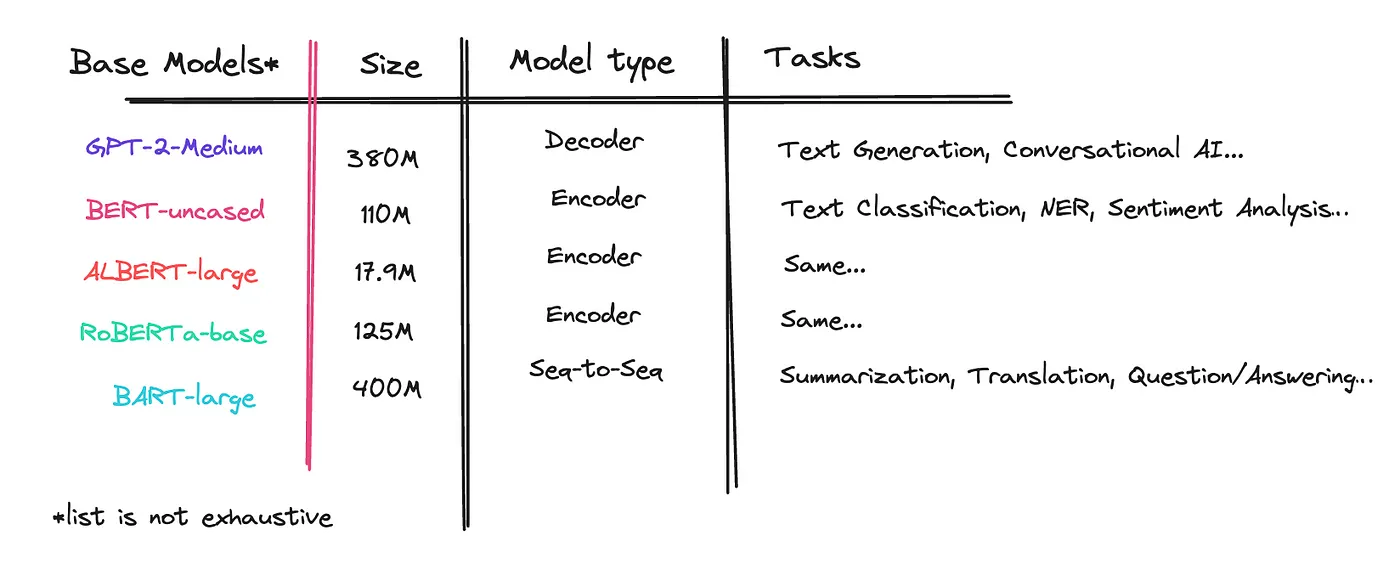
The bigger models usually perform better for more complex tasks, so be a bit strategic on how you use them. With big, for the smaller models, I mean around 400–500M parameters.
If you are a bit lost, remember to look at the model types here. Also check different business cases for the different models here.
For my case, I will try BART as a base model and will use Summarization as the task for a model that will extract tech terms and names from texts.
Maybe this is an odd choice as an encoder model seem to be the better choice for keyword extraction. With a seq-to-seq model I may end up with summary keywords, rather than just the keywords. I.e. it may create its own. But I’m ok with this.
I will also use a fairly large pre-trained model of 400 million parameters. I would suggest you build one with a smaller model to see how it does, as the hosting costs increase with the size of the model.
Obtain a Dataset
After you’ve decided on your model and your task, next is to obtain a dataset.
The dataset will look different based on the model you will be training. For me, as I’m training a Seq2Seq model (BART-large) as mentioned above, I will have a text and a target — the keywords — in my dataset.
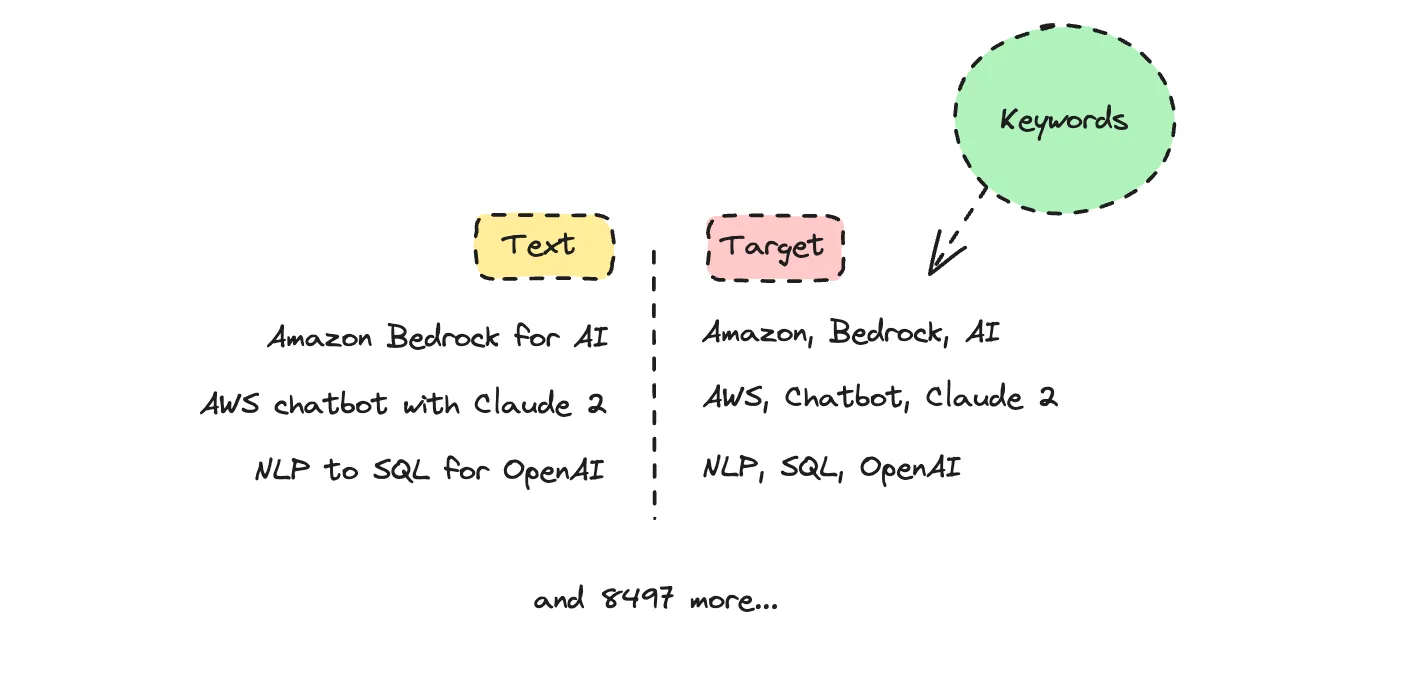
As for the size of it, maybe 3000 texts will do well enough, but ideally you’ll need at least 8,000 examples. Either you create your own dataset or you use an already created dataset that has been shared by someone else.
My dataset is 8,500 texts. You’ll find it here so you can use the same data. It has several rows so you can pick another field such as summary or topic as your target instead.
Another option is to browse the Hugging Face hub for a dataset you can use. Here you’ll have large datasets as options which is great if you’re just getting started.
If you’re building this dataset from scratch, see this script on generating your new dataset with GPT-4. This will be faster. But even with help, creating your own data is hard work. I manually checked my dataset and it took me two days to properly go through it.
Once you’ve decided on your dataset, you’ll have to make sure to split your data into a training, testing and validation set. The split usually is 80% of data for training, 10% validation and 10% testing depending on how small or large your dataset is.
To create a dataset dict with the appropriate datasets using either a custom CSV file or import a dataset from Hugging Face in Colab, see these cook books. Most datasets in Hugging Face are already processed with the appropriate sets, but if they are incomplete you can use these cook books as a guide.
My dataset already has the proper sets set up so no need to tweak it. You’ll see what this looks like when we import it into a Colab notebook.
Shop Around for a Base Model
I’ve seen many ‘shop’ around for a base model before they decide which one to take. You can fine-tune a base model directly or a model that has already been fine-tuned and fine-tune it further. It needs to be a transformer model though.
I have never liked the results from fine-tuning an already fine-tuned model but it is possible. This is when it has been fine-tuned for a specific task not pre-trained.
You can either test a bit in Hugging Face directly using the Inference API or open up a Colab notebook and use their pipeline.
Process the Dataset
Let’s start.
If I am working with custom data, I can get it from my Google Drive. If you’re doing the same you would start a bit differently. Here you would first import the file and then create a dataset dict with the training, validating and test sets. Here is the cook book for this.
What we’ll do here is just import my dataset from Hugging Face so we can use it.
Open up a new Colab notebook. The entire script for this process you’ll find here if you want it generated for you.
If you want to go through the process, we’ll start by importing all the dependencies we need.
!pip install -U datasets
!pip install -U accelerate
!pip install -U transformers
!pip install -U huggingface_hub
Then we’ll import the dataset we’ll be using. Here it’s your choice what dataset you’ll import.
from datasets import load_dataset
dataset = load_dataset("ilsilfverskiold/tech-keywords-topics-summary")
This one will already have a training, validation and test set setup for you. It should log this if you run it.
DatasetDict({
    train: Dataset({
        features: ['id', 'source', 'text', 'timestamp', 'reactions', 'engagement', 'url', 'text_length', 'keywords', 'topic', 'summary', '__index_level_0__'],
        num_rows: 7196
    })
    validation: Dataset({
        features: ['id', 'source', 'text', 'timestamp', 'reactions', 'engagement', 'url', 'text_length', 'keywords', 'topic', 'summary', '__index_level_0__'],
        num_rows: 635
    })
    test: Dataset({
        features: ['id', 'source', 'text', 'timestamp', 'reactions', 'engagement', 'url', 'text_length', 'keywords', 'topic', 'summary', '__index_level_0__'],
        num_rows: 635
    })
})
The validation and testing sets are really low. I found it did alright but ideally you’d want all around more data.
If you’re importing a dataset without a specific set such as validation and testing, see this cook book.
We can map out some examples from the dataset to see what it looks like.
def show_samples(dataset, num_samples=3, seed=42):
    sample = dataset["train"].shuffle(seed=seed).select(range(num_samples))
    for example in sample:
        print(f"\n'>> Text: {example['text']}'")
        print(f"'>> Keywords: {example['keywords']}'")


show_samples(dataset)
This will log the following.
'>> Text: Driverless car users will not be prosecuted for fatal crashes in UK'
'>> Keywords: Driverless Cars, Legal Issues, UK'

'>> Text: Google is embedding inaudible watermarks right into its AI generated music -'
'>> Keywords: Google, AI Music, Watermarks, Audio Technology'

'>> Text: What are your thoughts on Nextjs performance? Do you agree with this chart? - ( by 10up where Nextjs appears lower than WordPress on core vitals. Couldn’t post the image here due to community rules. But appreciate any other studies and thought you have on this matter.'
'>> Keywords: Next.js, Performance, 10up, WordPress'
Here I’m using text and keywords as fields. You may decide to use other fields though.
Next we’ll get the tokenizer for the base-model we’re using so we can check if our texts are too long to be processed as a single input. A tokenizer converts text into tokens, allowing models to understand language. BART has a 1024 token limit for each input.
from transformers import AutoModelForSeq2SeqLM, AutoTokenizer

model_name = 'facebook/bart-large' # go smaller if you can
tokenizer = AutoTokenizer.from_pretrained(model_name)
model = AutoModelForSeq2SeqLM.from_pretrained(model_name)

texts = dataset['train']['text']

# Tokenize all texts and find the maximum length (max for BART is 1024 tokens)
max_token_length = max(len(tokenizer.encode(text, truncation=True)) for text in texts)
print(f"The longest text is {max_token_length} tokens long.")
I’m way below this token limit though, but I suppose it’s good practice to check.
Now we’ll preprocess this data and convert both the input text and the target (i.e. the keywords) into a format suitable for training a sequence-to-sequence model.
def get_feature(batch):
  encodings = tokenizer(batch['text'], text_target=batch['keywords'],
                        max_length=1024, truncation=True)

  encodings = {'input_ids': encodings['input_ids'],
               'attention_mask': encodings['attention_mask'],
               'labels': encodings['labels']}

  return encodings

dataset_pt = dataset.map(get_feature, batched=True)
dataset_pt
Remember data preprocessing functions would look different if you are using a model with a different architecture, such as an encoder-only or decoder-only model. This one is designed to handle both the input text and the target outputs (in this case, keywords).
This dataset_pt will now log a few new fields, input_ids, attention_mask and labels.
DatasetDict({
    train: Dataset({
        features: ['id', 'source', 'text', 'timestamp', 'reactions', 'engagement', 'url', 'text_length', 'keywords', 'topic', 'summary', '__index_level_0__', 'input_ids', 'attention_mask', 'labels'],
        num_rows: 7196
    })
    validation: Dataset({
        features: ['id', 'source', 'text', 'timestamp', 'reactions', 'engagement', 'url', 'text_length', 'keywords', 'topic', 'summary', '__index_level_0__', 'input_ids', 'attention_mask', 'labels'],
        num_rows: 635
    })
    test: Dataset({
        features: ['id', 'source', 'text', 'timestamp', 'reactions', 'engagement', 'url', 'text_length', 'keywords', 'topic', 'summary', '__index_level_0__', 'input_ids', 'attention_mask', 'labels'],
        num_rows: 635
    })
})
We will specify that these new fields are the ones that should be returned.
columns = ['input_ids', 'labels', 'attention_mask']
dataset_pt.set_format(type='torch', columns=columns)
The last thing we’ll do before we start to train the model is get the data collator for a sequence to sequence model.
The data collator is responsible for dynamically padding the batches to the maximum length in each batch which is crucial for efficient training of transformer models like BART or T5.
from transformers import DataCollatorForSeq2Seq

data_collator = DataCollatorForSeq2Seq(tokenizer, model=model)
Padding will look different depending on the type of model you use.
When looking at the preprocessing function and data collator, see it as us trying to translate human readable text into something a computer will understand.
Models are designed differently and that’s why it may look different if you were to use an encoder-only or decoder-only model.
Training the Model
We should be ready to start training the model. We’re using the Trainer API which abstracts a lot of complexity here and makes it easy for us to fine-tune transformer models.
Make sure you switch your runtime on Colab to use at least T4. If you’re on a pro plan you can use the V100 but then also increase the batch size to at least 8.
from transformers import TrainingArguments, Trainer

training_args = TrainingArguments(
    output_dir = 'bart_tech_keywords', # rename to what you want it to be called
    num_train_epochs=3, # your choice
    warmup_steps = 500,
    per_device_train_batch_size=4,
    per_device_eval_batch_size=4,
    weight_decay = 0.01,
    logging_steps = 10,
    evaluation_strategy = 'steps',
    eval_steps=50,
    save_steps=1e6,
    gradient_accumulation_steps=16
)

trainer = Trainer(model=model, args=training_args, tokenizer=tokenizer, data_collator=data_collator,
                  train_dataset = dataset_pt['train'], eval_dataset = dataset_pt['validation'])

trainer.train()
If you want to read more to understand the parameters go to the Trainer API docs. It depends a bit on what gear you are training this on.
If you’re using a large dataset here it may take up to two hours, but if you’re using this small dataset of 8,500 rows then this will be a 10 minute ordeal.
Once you start the process, what we’re looking for here is overfitting. The training loss should consistently decrease, whereas the validation loss may fluctuate but should decrease at the end.
Overfitting means that the model is fitting too well to our data which means it may not be able to generate unique answers. This will enable it to only generate output of data it has already been given which we do not want.
Ask the Hugging Face GPT about your parameters and results, it can help you interpret them.
Once it is done, save the model. Make sure you set the name you want.
trainer.save_model('tech-keywords-extractor')
Testing the Model
I did not set up any evaluation metrics in this run, which is not recommended, see my other article for help in setting this up though and to understand what means what.
For this model, I’ll just test it manually to see how it does on our test set.
from transformers import pipeline

pipe = pipeline('summarization', model='tech-keywords-extractor')

test_text=dataset['test'][0]['text']
keywords = dataset['test'][0]['keywords']
print("the text: ", text_test)
print("generated keywords: ", pipe(test_text))
print("orginal keywords : ",keywords)
You can also iterate over several examples so you can look them over one by one to see how they’re doing.
for i in range(0, 50):
    text_test = dataset['test'][i]['text']
    keywords = dataset['test'][i]['keywords']
    print("text: ", text_test)
    print("generated keywords: ", pipe(text_test)[0]['summary_text'])
    print("original keywords: ", keywords)
Here it is good to do some more proper testing but I didn’t. I was decently satisfied.
Push to Hugging Face
So if you’re ready you can push it to the Hugging Face hub to save it for future use.
To log in you’ll need to navigate to Hugging Face and your account Settings to find Access Tokens.
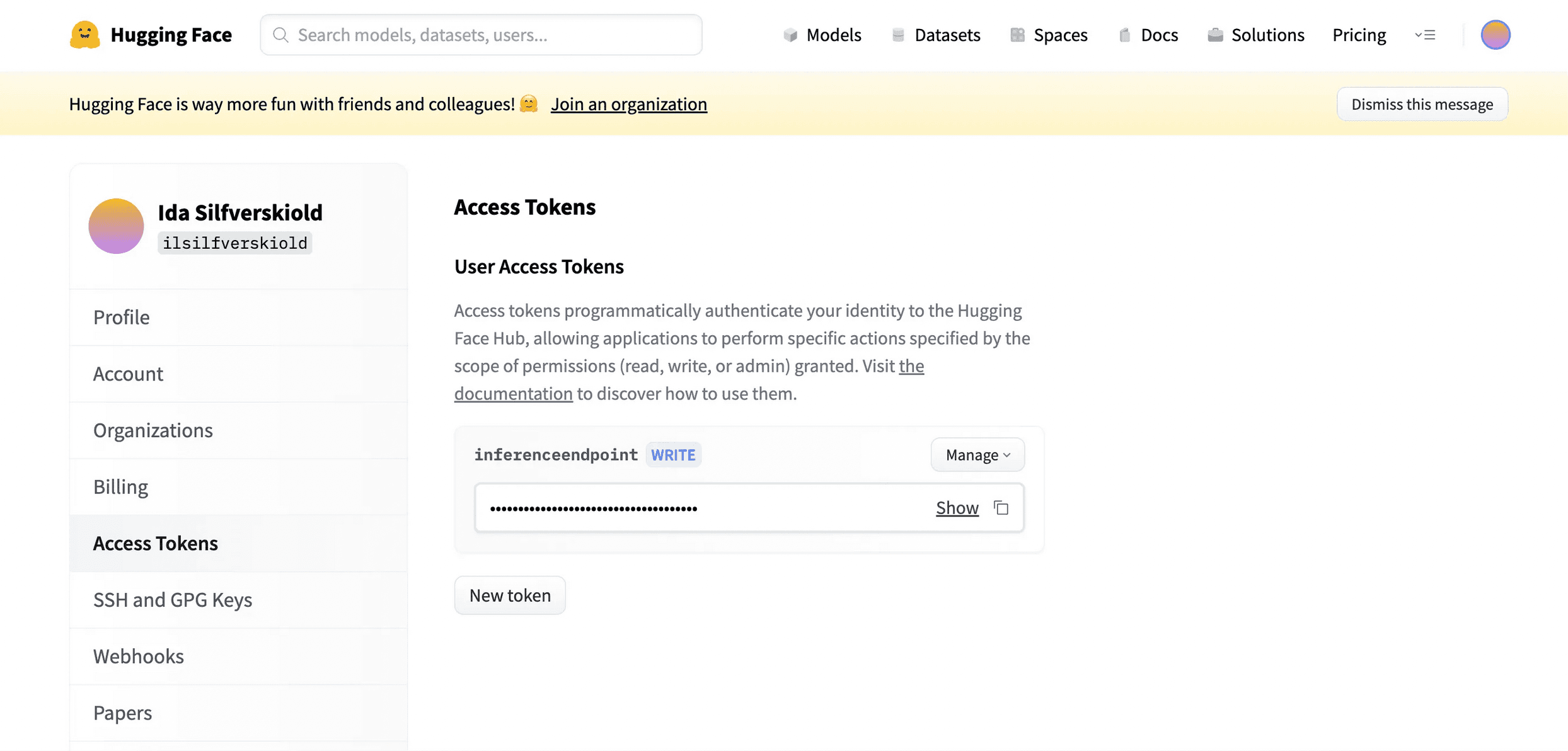
Once you’ve found it, create a new write token and copy it. Use it when they ask you for your token.
!huggingface-cli login
After you’ve logged in you can simply set your username and the path you want your model to be pushed to. This will create a new model repository for you.
# you would replace your own name here
# you do not need to create a repository beforehand
trainer.push_to_hub("your_hugging_face_username/tech-keywords-extractor")
We’re done.
If you’ve got stuck along the way, here is the full Colab notebook for what we’ve done here. I didn’t run the whole thing because I already pushed my model once.
❤